The Mechtrace Portal (portal.mechtrace.com) is where customers and vendors of Mechtrace and CS aerotherm see their orders, invoices, statements and machines. You sign in with your Mechtrace account on the page auth.mechtrace.com.
This guide shows how to set your password the first time, how to sign in, what to do if you forgot your password, and how to fix the most common problems.
You need
Details
Your email address
The one Mechtrace or CS aerotherm has for you. It is also your username.
A browser
Chrome, Edge, Safari or Firefox on a computer, tablet or phone. Cookies must be allowed.
Your email inbox
For the set-password and reset-password emails.
Mechtrace Login Invite Email
First sign-in: set your password
When your account is created you receive the email “Your Mechtrace account is ready - set your password” from Mechtrace.
The set-password email. (1) Set my password. (2) The link works for 3 days.
Open the email and click Set my password (1). The link works for 3 days (2).
If a page says Perform the following action(s), click » Click here to proceed.
Click “Click here to proceed”.
Type a new password (1) and the same password again (2). Use the eye button to check what you typed.
Leave Sign out from other devices (3) ticked unless you are signed in on another device you trust.
Click Submit (4).
Choose your password.
You see All set — your password is saved. Click Sign in to the Mechtrace Portal (1), or wait 3 seconds and it opens by itself.
Sign in with your email address and your new password (see section 3).
Password saved. (1) Go to the portal. (2) This help page.
Signing in
Go to portal.mechtrace.com. You are taken to the sign-in page on auth.mechtrace.com.
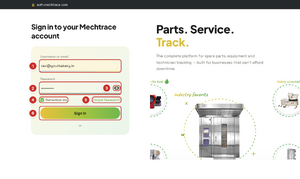
Enter your email address (1) and your password (2). The eye button (3) shows what you typed.
Tick Remember me (4) on your own computer or phone, so you stay signed in.
Click Sign In (6). Mechtrace Sign in
The sign-in page. (5) Forgot Password? - see section 4.
The same page on a phone.
Tip: Do not tick Remember me on a shared or public computer. Sign out from the portal menu when you are done.
Forgot your password
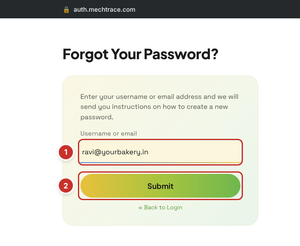
On the sign-in page click Forgot Password?.
Enter your email address (1) and click Submit (2).
Ask for a reset email.
Mechtrace Login Forgot PasswordThe sign-in page shows You should receive an email shortly with further instructions.
The reset email is on its way.
Open the email “Reset password” and click Link to reset credentials (1) straight away: it works for only 5 minutes (2).
Choose your new password as in section 2 and click Submit. You are then signed in.
The reset-password email.
Note: If the reset link has expired, start again with Forgot Password? - you will get a new link. Only the newest link works.
Problems and how to fix them
Mechtrace Login Invalid Password
“Invalid username or password.”
(1) The message. (2) Check the email address for typing mistakes. (3) Forgot Password?
Check
What to do
Email address typed correctly?
Look letter by letter - e.g. yourbakry.in instead of yourbakery.in. Use the address on our emails to you.
Have you set a password yet?
If you never clicked Set my password in the welcome email, use Forgot Password? (section 4).
Caps Lock on?
Passwords are case-sensitive. Use the eye button to see what you typed.
Tried many times?
After several wrong passwords the account may be blocked for a while - wait 15 minutes, then use Forgot Password?
The email does not arrive
Wait 5 minutes.
Look in Spam / Junk, and in Gmail also in Promotions and Updates. Search your inbox for Mechtrace.
Check the address you typed on the Forgot Password page.
Still nothing? Ask us to send a new email (section 6). Company mail filters sometimes block it - ask your IT team to allow mail from mechtrace.com.
Mechtrace Login Action Expired
“We are sorry… Action expired.”
(1) The link is too old or was already used.
The welcome link works for 3 days, the reset link for 5 minutes, and each link only once. Use Forgot Password? on the sign-in page to get a fresh link (section 4).
“Passwords don't match.”
Mechtrace Passwords Don’t Match
(1) The message. (2) Type the same password in both boxes.
Type the same password in New Password and Confirm password. Use the eye buttons to compare.
You see a “Personal info” page instead of the portal
This is your account settings page, not the portal.
Your password is saved. Open portal.mechtrace.com and sign in with your email address and password. You do not need to change anything on the Personal info page.
Mechtrace Personal Info
Other problems
What you see
What to do
Signed in as someone else (shared computer)
Open the portal menu and Sign out, then sign in with your own email address.
“You are already authenticated as different user …”
Someone else is still signed in on this browser. Close all Mechtrace tabs, open portal.mechtrace.com, sign out, then sign in again.
“Restart login cookie not found” or the page keeps reloading
Allow cookies for mechtrace.com, do not use a private / incognito window, close the tab and start again at portal.mechtrace.com.
“Login timeout. Please sign in again.”
The sign-in page was open too long. Start again at portal.mechtrace.com.
Asked to sign in again every time
Tick Remember me. Do not clear browser data when closing the browser.
Wrong company name, or orders / invoices missing
Your account may be linked to another contact. Write to us (section 6) with your company name and GSTIN.
Still need help?
Write to contactus@mechtrace.com with: the email address you sign in with, your company name, what you were doing, and a screenshot of the message. We reply on working days.